Ready to play GTM?
Let's get started!
Discover the world of GTA in Minecraft!
Hop into the city of MineSantos and kill anyone who stands in your way.
As you level up, gain access to more and more powerful weapons and vehicles, and purchase a wonderful house to store all your stuff.
Will you become the next Crime Lord of Los Santos?
Step 1
Adding GTM to your servers
- Launch Minecraft: Java Edition
- Click "Multiplayer"
- Click "Add Server"
- Enter the IP: mc-gtm.net
- Switch Server Resource Packs to "Enabled"
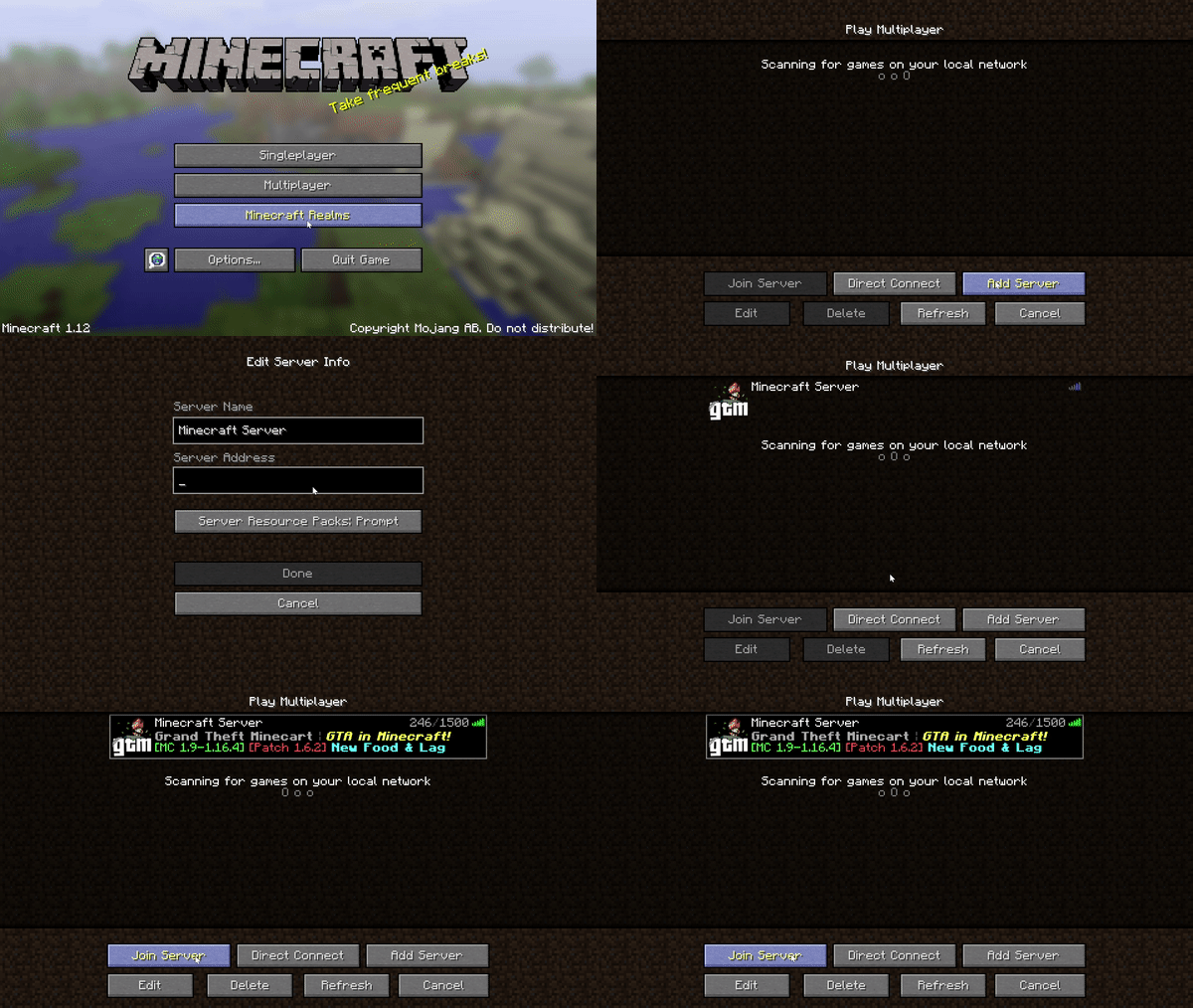
Step 2
Joining GTM
- Click GTM in your server list
- Click "Join Server"
- Use the Server Warper to choose a GTM server:
- GTM New Mineport: perfect for new players
- GTM Sanktburg: for German speakers
- GTM MineSantos: the original GTM server
- Wait for the Resource Pack to load
- (This can take up to 10 seconds)
- Enjoy!
Problems left to resolve: page is not responsive for mobile, gifs go off the screen if the screen is not wide enough (especially mobile), insert gif for joining the server, the nested list doesn't work and shows as one straight list, also the bullet points aren't visible
Ideas: add a mailing list signup for players who are visiting this page on mobile and aren't able to join right away, make the shown IP different based on the UTM source